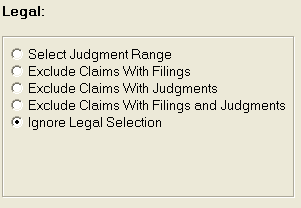
The Legal Selection allows users to narrow down the accounts to be included in the export file by filings and judgments.
The Select Judgment Range allows users to include only accounts that have judgments within a date range.
Click the
 button next to Select Judgment Range to select this option.
A Judgment
Date Range box will be displayed at the bottom of the screen.
button next to Select Judgment Range to select this option.
A Judgment
Date Range box will be displayed at the bottom of the screen.
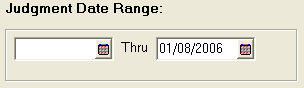
Enter the date range.
The Exclude Claims with Filings option will exclude any claim with filing information added to the litigation screen.
Click the
button next to Exclude Claims with Filings to select
this option.
The Exclude Claims with Judgments option will exclude any claim with judgment information added to the litigation screen.
Click the
button next to Exclude Claims with Judgments to select
this option.
The Exclude Claims with Filings and Judgments option will exclude any claim with filing and judgment information added to the litigation screen.
Click the button next to Exclude Claims with Filings and Judgments
to select this option.
The Ignore Legal Selection option will include all claims no matter the filing or judgment information on the litigation screen.
Click the button next to Ignore Legal Selection to select this option.